
こんにちは、ひでまるです。今ちょうどNeovimの設定を書き直してます。まず大前提として私がVimを使い始めた理由として軽量だったことが挙げられます。(「かっこいい中二病エンジニア」に憧れたことも理由の一つではありますが・・・)
それが今ではどうでしょうか。導入された180↑個のプラグイン、起動に1秒かかってはすぐにはファイルを開かせてくれないNeovim、コマンドを実行してコマンドバッファーでフリーズするなどして感じたストレス。
私の好きなNeovimはどこにいったということで、dotfilesを作り直そうと思います。
ディレクトリ構造
私のNeovimはとてもでっかいNeovimです。効率的に管理・保守するためにはディレクトリ構造を工夫するべきです。
例として私は以下のディレクトリ構造を採用しています。
nvim/├── init.lua├── autoload/│ └── jetpack.vim -- プラグインマネージャー本体└── lua/ ├── core/ │ ├── options.lua -- Neovim の基本設定 │ ├── keymaps.lua -- キーマッピング │ │ ... │ └── utils.lua -- ユーティリティ関数 └── plugins/ ├── jetpack.lua -- プラグインマネージャー の設定 ├── lspconfig.lua -- LSP の設定 │ ... └── treesitter.lua -- Treesitter の設定これらのファイルはinit.luaにてrequire関数を使って読み込むことにします。
Neovimのコア設定
基本設定
まずは、プラグインなしでも設定できるインデントサイズや行数表示など基本的なテキストエディットに必要な設定をします。
require("core.options")local options = { encoding = "utf-8", fileencoding = "utf-8", shell = "fish", number = true, autoindent = true, tabstop = 2, shiftwidth = 2, helplang = "ja", virtualedit = "onemore", expandtab = true, splitright = true, hls = true, smartindent = true, showmatch = true, laststatus = 2, updatetime = 250, signcolumn = "yes",}
vim.cmd([[ set mouse-=nvi set wildmode=list:longest]])
for k, v in pairs(options) do vim.opt[k] = vendキーマップ
require("core.keymaps")local opt = { silent = true, noremap = true }local opt_expr = { silent = true, noremap = true, expr = true }カラー
Neovimのモチベーションの一部の見た目の設定です。
-- カラースキーマはプラグインマネージャーでインストールされるため、`require(plugins.jetpack)`の後にこれをする必要があります。require("core.colors")vim.api.nvim_create_autocmd("ColorScheme", { pattern = "*", callback = function() vim.api.nvim_set_hl(0, "NormalFloat", { bg = "NONE" }) vim.api.nvim_set_hl(0, "FloatBorder", { fg = "gray", bg = "NONE" }) end,})
vim.cmd("syntax enable")
if vim.fn.has('termguicolors') == 1 then vim.opt.termguicolors = trueend
vim.opt.background = 'dark'ファイルタイプ
Neovimがデフォルトで対応していない拡張子を追加してあげます。これを追加しなければ。フォーマッターが働かないなどの不都合が起こります。
require("core.filetypes")vim.filetype.add({ extension = { mdx = "mdx", },})コマンド
require("core.commands")-- will add commandsLSP
LSPがsigncollumという左側の表示する領域に出力するテキストをあらかじめ変更しておきます。

require("core.lsp")vim.cmd("set signcolumn=yes")
local signs = { Error = "", Warn = "", Hint = "💡", Info = "" }vim.diagnostic.config({ virtual_text = true, signs = { enable = true, text = { ["ERROR"] = signs.Error, ["WARN"] = signs.Warn, ["HINT"] = signs.Hint, ["INFO"] = signs.Info, }, texthl = { ["ERROR"] = "DiagnosticDefault", ["WARN"] = "DiagnosticDefault", ["HINT"] = "DiagnosticDefault", ["INFO"] = "DiagnosticDefault", }, numhl = { ["ERROR"] = "DiagnosticDefault", ["WARN"] = "DiagnosticDefault", ["HINT"] = "DiagnosticDefault", ["INFO"] = "DiagnosticDefault", }, severity_sort = true, },})プラグインマネージャー
Neovimとプラグインは切っても切り離せないものです。それを支えてくれるプラグインマネージャーをインストールします。私はvim-jetpackを選定しました。選定理由としては、設定が簡単なのにとても軽量に働くということです。
# vim-jetpackをダウンロードmkdir autoload && cd autoloadwget https://github.com/tani/vim-jetpackcd ..
# vim-jetpackを読み込むように構成vim init.lua
vim plugins/jetpack.luavim.cmd([[runtime ./autoload/jetpack.vim]])
require("plugins.jetpack")vim.cmd("packadd vim-jetpack")
require("jetpack.packer").add { {"tani/vim-jetpack"}, -- bootstrap}これらを構成してneovimを再起動すると、コマンドラインにSome packages...のようなテキストが表示されるので:JetpackSyncとプラグインをインストールするコマンドを入力すればJetpackのインストールが完了します。
 https://github.com/tani/vim-jetpack

プラグインのインストール
プラグインは高速化のためになるべくLua製のプラグインあることを主に選定します。よって既存のvimプラグインもなるべくluaプラグインに置き換えます。
vim-jetpackでプラグインを追加するには、require("jetpack.packer").add {}の関数中にこれを追加するべきでしょう。
{"username/reponame"},前述した通り、サクサクなneovimを作るにはこのプラグインを追加する際にともに指定できるオプションを突き詰める必要があります。オプションを突き詰めるとプラグインを遅延して読み込むことができて、無駄なリソースを省くことができます。
遅延読み込みに使うオプションは主に以下の4つが挙げられます。
| Parameter | Type | Description |
|---|---|---|
cmd | string or array | On-demand loading plugins by commands. |
keys | string or array | On-demand loading plugins by keymaps. |
event | string or array | On-demand loading plugins by event. |
ft | string or array | On-demand loading plugins by filetypes. |
https://github.com/tani/vim-jetpack?tab=readme-ov-file#modern-packernvim-paqnvim-style
カラースキーマ
カラースキーマはgruvboxを使うことにしました。これがなければ出るやる気も出るはずがありません。
https://github.com/morhetz/gruvbox
{ "morhetz/gruvbox", config = function() vim.cmd([[colorscheme gruvbox]]) end,},nvim-treesitter
きっとみなさんはすでにnvim-treesitterを存じてられると思うので、詳細な説明は省かせていただきます。
nvim-treesitterはNeovimを使うなら必須のプラグインです。Neovimで開いたテキストファイルの構文をカラフルにハイライトしてくれます。
https://github.com/nvim-treesitter/nvim-treesitter
左: Neovimのデフォルトのシンタックスハイライト。右: treesitterでのシンタックスハイライト

{ "nvim-treesitter/nvim-treesitter", event = { "VimEnter" }, run = ":TSUpdate", config = function() require("plugins.treesitter") end,},vim.opt.runtimepath:append("~/dotfiles/templates/treesitter")
-- Nvim 0.10.0vim.treesitter.language.register("markdown", { "mdx" })
require("nvim-treesitter.configs").setup({ -- A list of parser names, or "all" sync_install = false,
auto_install = true,
-- ignore filetypes -- ignore_install = { "astro" },
parser_install_dir = "~/dotfiles/templates/treesitter", highlight = { enable = true, additional_vim_regex_highlighting = false, }, rainbow = { enable = true, extended_mode = true, -- Also highlight non-bracket delimiters like html tags, boolean or table: lang -> boolean max_file_lines = nil, -- Do not enable for files with more than n lines, int }, autotag = { enable = true, },})
local parser_config = require("nvim-treesitter.parsers").get_parser_configs()parser_config.hypr = { install_info = { url = "https://github.com/luckasRanarison/tree-sitter-hypr", files = { "src/parser.c" }, branch = "master", }, filetype = "hypr",}conform.nvim
conform.nvimはフォーマッターをイイ感じに動かしてくれます。長年愛用してる。ファイルを保存した際に自動でフォーマッターが走ります。
https://github.com/stevearc/conform.nvim
{ "stevearc/conform.nvim", event = "BufWritePre", config = function() require("plugins.conform") require("conform").format() end,}, -- formatterapi.nvim_create_autocmd("BufWritePre", { pattern = "*", callback = function(args) require("conform").format({ bufnr = args.buf }) end,})local web_formatter = { "prettier", stop_after_first = true }
local web_filetypes = { "javascript", "typescript", "javascriptreact", "typescriptreact", "css", "html", "json", "jsonc", "yaml", "markdown", "graphql", "scss",}
local formatters_by_ft = { lua = { "stylua" }, python = { "isort", "black" }, astro = { "prettier" }, mdx = { "prettier" }, sh = { "shfmt" }, bash = { "shfmt" }, fish = { "fish_indent" }, rust = { "rustfmt" }, go = { "gofmt" }, zig = { "zigfmt" }, ["*"] = { "trim_whitespace", "trim_newlines" }, -- ["_"] = { "trim_whitespace", "trim_newlines", "codespell" },}
for _, ft in ipairs(web_filetypes) do formatters_by_ft[ft] = web_formatterend
-- configure languagelocal rustfmt = require("conform.formatters.rustfmt")rustfmt.args = function() return { "--edition", "2021", "--emit", "stdout" }end
require("conform").setup({ formatters_by_ft = formatters_by_ft, format_on_save = { -- I recommend these options. See :help conform.format for details. lsp_fallback = true, timeout_ms = 500, },})LSP関連のプラグイン
これからインストールするプラグインを大まかに分けると主に3つで、nvim-cmpとnvim-lspconfigとcoc.nvimです。
nvim-lspconfigについて
nvim-lspconfigはNeovim built in LSPの設定をするプラグインです。LSPとは言語機能(補完・ジャンプ・診断など)に関係する標準規格でMicrosoftがVisual Studio Codeの開発のために実装してものです。これがないと現代のテキストエディットができないのでインストールします。
https://github.com/neovim/nvim-lspconfig

nvim-cmpについて
nvim-cmpは補完をするインタフェースを提供するプラグインです。カスタマイズ性がとても高くて、補完のソースやユーザーインタフェースをリッチにするなど使い手好みにカスタマイズできます。私のお気に入りプラグインの一つです。
私の設定では主要なキーバインドは三つです。
| keymap | action |
|---|---|
<CR> | 選択されている補完先を決定する。 |
<Tab> | 次の補完候補を選択する。 |
<S-Tab> | 前の補完候補を選択する。 |
 https://github.com/hrsh7th/nvim-cmp
また、nvim-cmpは代替プラグインの mini.completion と blink.cmp があるので機会があったらそちらも試してみたいですね。
mason.nvimについて
mason.nvimはNeovimからコードを書くのに必要なLSPとDAP、Formatter/Linterをダウンロードするインタフェースを提供するプラグインです。
https://github.com/mason-org/mason.nvim
コマンドラインで、:Masonを実行すると写真のインタフェースを呼び出すことができて、ここでLSPなどを管理できます。

キーバインドについては以下をご参照ください。
| キーマップ | 説明 |
|---|---|
<CR> | パッケージを展開するためのキーマップ |
i | 現在のカーソル位置にあるパッケージをインストールするためのキーマップ |
u | 現在のカーソル位置にあるパッケージを再インストール/更新するためのキーマップ |
c | 現在のカーソル位置にあるパッケージの新しいバージョンを確認するためのキーマップ |
U | インストールされているすべてのパッケージを更新するためのキーマップ |
C | インストールされているどのパッケージが古いかを確認するためのキーマップ |
X | パッケージをアンインストールするためのキーマップ |
<C-c> | パッケージのインストールをキャンセルするためのキーマップ |
<C-f> | 言語フィルターを適用するためのキーマップ |
<CR> | パッケージインストールのログ表示を切り替えるためのキーマップ |
g? | ヘルプビューを切り替えるためのキーマップ |
mason.nvimでインストールしたLSPを構成するために必要なmason-lspconfig.nvimもインストールします。
https://github.com/mason-org/mason-lspconfig.nvim

さて、これらのプラグインの設定は便宜上一括で作業する必要があります。
plugins/jetpack.lua
-- ======= LSP ======={ "neovim/nvim-lspconfig", event = { "BufNewFile", "BufReadPre", "InsertEnter", "CmdLineEnter" }, config = function() require("plugins.lspconfig") end, requires = { "mason-org/mason.nvim", "mason-org/mason-lspconfig.nvim", { "hrsh7th/nvim-cmp", config = function() require("plugins.cmp") end, requires = { -- cmp sources "hrsh7th/cmp-nvim-lsp", "hrsh7th/cmp-buffer", "hrsh7th/cmp-path", "hrsh7th/cmp-cmdline", "petertriho/cmp-git", "saadparwaiz1/cmp_luasnip", { "zbirenbaum/copilot-cmp", after = { "copilot.lua" }, config = function() require("copilot_cmp").setup() end, }, -- cmp deps "onsails/lspkind.nvim", { "L3MON4D3/LuaSnip", run = "make install_jsregexp", -- add snippets requires = { "rafamadriz/friendly-snippets", }, }, -- snippets manager { "zbirenbaum/copilot.lua", config = function() require("plugins.copilot") end, }, }, }, -- nvim cmp },},plugins/cmp.lua
local status_ok, cmp = pcall(require, "cmp")if not status_ok then vim.notify("cmp not found", vim.log.levels.WARN) returnend
local lspkind_status_ok, lspkind = pcall(require, "lspkind")if not lspkind_status_ok then vim.notify("lspkind not found for cmp", vim.log.levels.WARN)end
local luasnip_status_ok, luasnip = pcall(require, "luasnip")if not luasnip_status_ok then vim.notify("luasnip not found for cmp", vim.log.levels.WARN)end
local has_copilot, copilot = pcall(require, "copilot.suggestion")if not has_copilot then vim.notify("copilot.suggestion not found for cmp", vim.log.levels.INFO)end
-- The following options are generally recommended for nvim-cmpvim.opt.completeopt = { "menu", "menuone", "noselect" } -- Removed noinsert
-- Highlight group for CmpItemKind similar to CmpItemMenuDefaultvim.api.nvim_set_hl(0, "CmpItemKind", { link = "CmpItemMenuDefault" })
cmp.setup({ snippet = { expand = function(args) if luasnip then require("luasnip/loaders/from_vscode").lazy_load({ paths = { vim.fn.stdpath("data") .. "/site/pack/jetpack/opt/friendly-snippets", "./snippets", }, }) luasnip.lsp_expand(args.body) end end, }, mapping = cmp.mapping.preset.insert({ ["<C-d>"] = cmp.mapping.scroll_docs(-4), ["<C-f>"] = cmp.mapping.scroll_docs(4), ["<C-Space>"] = cmp.mapping.complete(), ["<C-e>"] = cmp.mapping.abort(), -- Changed from close() to abort() for consistency ["<CR>"] = cmp.mapping.confirm({ behavior = cmp.ConfirmBehavior.Replace, select = true, }), ["<Tab>"] = cmp.mapping(function(fallback) if cmp.visible() then cmp.select_next_item() elseif luasnip and luasnip.expand_or_jumpable() then luasnip.expand_or_jump() else fallback() end end, { "i", "s" }), ["<S-Tab>"] = cmp.mapping(function(fallback) if cmp.visible() then cmp.select_prev_item() elseif luasnip and luasnip.jumpable(-1) then luasnip.jump(-1) else fallback() end end, { "i", "s" }), }), sources = cmp.config.sources({ { name = "nvim_lsp" }, { name = "luasnip" }, { name = "buffer" }, { name = "path" }, { name = "copilot" }, }), formatting = { format = lspkind_status_ok and lspkind.cmp_format({ mode = "symbol_text", -- Changed from "symbol" maxwidth = 50, ellipsis_char = "...", symbol_map = { Copilot = "", Text = " ", Method = " ", Function = " ", Constructor = " ", Field = " ", Variable = " ", Class = " ", Interface = " ", Module = " ", Property = " ⅊ ", Unit = " ◫ ", Value = " ", Enum = " ", Keyword = " ", Snippet = " ", Color = " ", File = " ", Reference = " ", Folder = " ", EnumMember = " ", Constant = " ", Struct = " ", Event = " ", Operator = " ∏ ", TypeParameter = " ", }, -- menu = { -- buffer = "[Buffer]", -- nvim_lsp = "[LSP]", -- luasnip = "[LuaSnip]", -- nvim_lua = "[Lua]", -- copilot = "[Copilot]", -- }, }) or nil, }, window = { completion = cmp.config.window.bordered({ border = "rounded", winhighlight = "Normal:Pmenu,FloatBorder:Pmenu,Search:None", col_offset = -3, side_padding = 0, }), documentation = cmp.config.window.bordered({ border = "rounded", winhighlight = "Normal:Pmenu,FloatBorder:Pmenu,Search:None", }), }, experimental = { ghost_text = false, -- Consider enabling if you like ghost text },})
-- Set configuration for specific filetype.cmp.setup.filetype("gitcommit", { sources = cmp.config.sources({ { name = "git" }, }, { { name = "buffer" }, }),})
-- Use buffer source for `/`cmp.setup.cmdline("/", { mapping = cmp.mapping.preset.cmdline(), sources = { { name = "buffer" }, },})
-- Use cmdline & path source for ':'cmp.setup.cmdline(":", { mapping = cmp.mapping.preset.cmdline(), sources = cmp.config.sources({ { name = "path" }, }, { { name = "cmdline" }, }),})plugins/lspconfig.lua
-- configure mason.nvimrequire("mason").setup({  ui = {    border = "rounded",  },})
local lspconfig = require("lspconfig")local capabilities = require("cmp_nvim_lsp").default_capabilities(vim.lsp.protocol.make_client_capabilities())
local servers = {  denols = {    root_dir = lspconfig.util.root_pattern("deno.json", "deno.jsonc", "deps.ts", "import_map.json"),    lint = true,    unstable = true,    suggest = {      imports = {        hosts = {          ["https://deno.land"] = true,          ["https://cdn.nest.land"] = true,          ["https://crux.land"] = true,        },      },    },  },  tsserver = {    root_dir = lspconfig.util.root_pattern("package.json"),    init_options = {      hostInfo = "neovim",      maxTsServerMemory = 4096,      tsserver = { useSyntaxServer = "never" },    },  },  lua_ls = {    settings = {      Lua = {        completion = {          callSnippet = "Replace",        },        runtime = {          version = "LuaJIT",        },        diagnostics = {          -- Get the language server to recognize the `vim` global          globals = {            "vim",            "require",          },        },        workspace = {          library = vim.api.nvim_get_runtime_file("", true),        },        telemetry = {          enable = false,        },      },    },  },}
require("mason-lspconfig").setup({ handlers = { function(server_name) local server_specific_config = servers[server_name] or {} local server_options = vim.tbl_deep_extend("force", { capabilities = capabilities }, server_specific_config) lspconfig[server_name].setup(server_options) end, },})次のcopilot.lua & copilot-cmpセクションのcopilot.luaを追加しないと起動した時にエラーが出ると思うので、copilot.luaのセットアップをするか、cmp.luaとjetpack.luaからcopilot関連の記述を削除するかでご対応ください。
必要なファイルを追加したらNeovimを起動し、プラグインをインストール後に:Masonで使用する言語に応じたLSP(例:Goはgopls、Rustはrust-analyzer、TypeScriptはtypescript-language-server)を導入すると補完とともにコードを書くことができるでしょう。
copilot.lua & copilot-cmp
copilot.luaはNeovimにGitHub Copilotのハンドラを追加する拡張機能です。デフォルト設定ではコードを書いている時に文脈から推測したコードを提案してくれますが、その機能をcopilot-cmpで利用したいため私は無効化しています。
copilot-cmpは前述の通り、copilotが文脈から推測した次に書くであろうコードを補完先として選択できるようにするプラグインです。copilot.luaの提案は補完候補としてではなくソースコード上に表示されてしまい煩わしかったので助かりました。
https://github.com/zbirenbaum/copilot.lua
 https://github.com/zbirenbaum/copilot-cmp


すでにcopilot.nvimとcopilot-cmpはインストールされているため、plugins/copilot.luaのファイルだけ作成するのみです。
require("copilot").setup({ panel = { enabled = false }, suggestion = { enabled = false },})設定して再起動したのちに、:Copilot authでGitHubアカウントにログインすると補完が使えると思います。Copilot自体が有効になっているかは:Copilot statusで確認できるのでトラブルシューティングにご利用ください。
lualine.nvim
エディターの下部にかっちょいいステータスラインを表示してくれます。モチベーションに関係するので必須と言っても過言ではありません。
https://github.com/nvim-lualine/lualine.nvim

{ "nvim-lualine/lualine.nvim", event = "VimEnter", requires = "kyazdani42/nvim-web-devicons", config = function() require("lualine").setup({ options = { theme = "gruvbox_dark" }, }) end,}, -- status line always loadingnvim-comment
サクサクとテキストにコメントを付けたり、外したりできるプラグインです。<C-c>でコメントの付け外しができます。
https://github.com/terrortylor/nvim-comment
{ "terrortylor/nvim-comment", cmd = "CommentToggle", config = function() require("nvim_comment").setup() end,}, -- quick commentvim.api.nvim_set_keymap("n", "<C-c>", "<Cmd>CommentToggle<CR>", opt)vim.api.nvim_set_keymap("v", "<C-c>", ":'<,'>CommentToggle<CR>", opt)reticle.nvim
編集中にカーソルを見失わないように強調表示してくれます。
https://github.com/tummetott/reticle.nvim
{ "tummetott/reticle.nvim", event = { "BufNewFile", "BufReadPre" }, config = function() require("plugins.reticle") end,}, -- decorate buffers writingrequire("reticle").setup({ -- Enable/Disable the cursorline and/or cursorcolumn at startup -- Default: false for both values on_startup = { cursorline = true, -- cursorcolumn = true, },})indent-blankline.nvim
インデントを表示するプラグインです。
https://github.com/lukas-reineke/indent-blankline.nvim

{ "lukas-reineke/indent-blankline.nvim", event = { "BufNewFile", "BufReadPre" }, config = function() require("ibl").setup({ indent = { char = "▏", }, }) end,}, -- show indentvim-system-copy
テキストをシステムクリップボードにコピーするプラグインです。こちらはlua製のものを探しましたが、良さげなものが見つからなかったのでvimlプラグインとなってます。ビジュアルモードでコピーしたいテキストを選択してcpとタイプするとテキストをコピーできます。
https://github.com/christoomey/vim-system-copy
{ "christoomey/vim-system-copy", event = "ModeChanged",}, -- copy to clipboardmdxsnap.nvim
Markdown/MDXの編集中にクリップボードの画像をコピペするプラグインです。クリップボードに画像がある状態で、:PasteImageコマンドを実行するとドキュメントに画像が挿入されます。customImportsだったりPastePathだったりと、高機能にカスタムできてあなたが使用しているCMSにも容易に適応できると思います。実は私が作っているので、デフォルトの機能で、どうしても対応できないCMSがありましたらぜひGitHubのissueページにてお知らせください。
https://github.com/HidemaruOwO/mdxsnap.nvim
{ "HidemaruOwO/mdxsnap.nvim", cmd = "PasteImage", ft = { "markdown", "mdx" }, config = function() require("plugins.mdxsnap") end,},-- In your Neovim configuration (e.g., init.lua or a dedicated plugins file)require("mdxsnap.config").setup({ -- Default path for saving images. -- If DefaultPastePathType is "relative", this is relative to the project root. -- If "absolute", this is used as an absolute path. DefaultPastePath = "snaps/images/posts", -- Default: "mdxsnaps_data/images/posts" DefaultPastePathType = "relative", -- Default: "relative" ("absolute" is also an option)
-- Override default settings for specific projects. -- Rules are evaluated in order; the first match is used. ProjectOverrides = { -- Example 1: Match by project directory name { matchType = "projectName", -- "projectName" or "projectPath" matchValue = "portfolio", -- The name of the project's root directory PastePath = "client/src/images/posts/", -- Custom path for this project PastePathType = "relative", customImports = { -- Override global customImports for this project { line = 'import { Image } from "astro:assets";', checkRegex = "astro:assets", }, { line = 'import { ImportImage } from "@/lib/functions";', checkRegex = "@/lib/functions", }, }, customTextFormat = '<Image alt="%s" src={ImportImage("%s")} />', -- Override global customTextFormat }, -- Example 2: Match by project's absolute path (supports ~ and $HOME) },
-- Custom import statements to ensure are present in the file. -- The plugin checks if an import matching `checkRegex` exists before adding `line`. customImports = { -- { -- line = 'import { Image } from "astro:assets";', -- The full import line -- checkRegex = "astro:assets", -- A string/regex to check for existing import -- }, -- Example: -- { line = 'import MyCustomImage from "@/components/MyCustomImage.astro";', checkRegex = '@/components/MyCustomImage.astro' }, },
-- Format for the inserted image reference text. -- `%s` is a placeholder. -- - If one `%s`: it's replaced by the image path. -- - If two `%s`: the first is replaced by alt text (filename stem of the new image), -- and the second by the image path. customTextFormat = "", -- Default: Markdown image format "" -- Example for Astro <Image /> component: -- customTextFormat = '<Image src={"%s"} alt="%s" />', -- Example for a simple <img> tag: -- customTextFormat = '<img src="%s" alt="%s" />',})telescope.nvim
写真のようなモダンなUIを提供してくれます。それをファイルマネージャーとして使うなどして、Neovimっぽさを感じさせてくれます。
https://github.com/nvim-telescope/telescope.nvim


キーバインドについては以下をご参照ください。
| keys | actions |
|---|---|
<C-s> | 今開いてるバッファーでfzfを使い曖昧検索する。(vimの/の代替) |
<C-m> | ファイルマネージャーを開く |
<C-S-m> | これまでに開いたファイルの履歴を表示する |
<C-.> | 絵文字と記号を手っ取り早く入力する |
{ "nvim-telescope/telescope.nvim", cmd = "Telescope", requires = { { "nvim-lua/plenary.nvim" }, { "nvim-telescope/telescope-fzf-native.nvim", run = "make" }, -- fzf on telescope { "nvim-telescope/telescope-symbols.nvim" }, -- view emojis and symbols { "nvim-telescope/telescope-media-files.nvim" }, -- image viewer { "nvim-telescope/telescope-frecency.nvim" }, -- search files by keywords { "HidemaruOwO/telescope-file-browser.nvim" }, -- file manager }, config = function() require("plugins.telescope") end,}, -- telescope-- telescopevim.api.nvim_set_keymap("n", "<C-s>", "<Cmd>Telescope current_buffer_fuzzy_find<CR>", opt)vim.api.nvim_set_keymap("n", "<C-m>", "<Cmd>Telescope file_browser path=%:p:h select_buffer=true<CR><ESC>", opt)vim.api.nvim_set_keymap("n", "<C-S-m>", "<Cmd>Telescope frecency<CR><ESC>", opt)vim.api.nvim_set_keymap("n", "<C-.>", "<Cmd>Telescope symbols<CR>", opt)vim.api.nvim_set_keymap("i", "<C-.>", "<Cmd>Telescope symbols<CR>", opt)local telescope = require("telescope")local act = require("telescope.actions")local fb_act = telescope.extensions.file_browser.actions-- Load extensionstelescope.load_extension("fzf")telescope.load_extension("media_files")telescope.load_extension("file_browser")-- Setup telescopetelescope.setup({ defaults = { borderchars = { "─", "│", "─", "│", "╭", "╮", "╯", "╰" }, mappings = { i = { ["C-s"] = act.select_vertical, ["C-S-s"] = act.select_horizontal, }, n = { ["s"] = act.select_vertical, ["S"] = act.select_horizontal, }, }, }, extensions = { fzf = { fuzzy = true, -- false will only do exact matching override_generic_sorter = true, -- override the generic sorter override_file_sorter = true, -- override the file sorter case_mode = "smart_case", -- or "ignore_case" or "respect_case" }, file_browser = { hijack_netrw = true, mappings = { ["n"] = { f = false, ["<CR>"] = fb_act.open, ["n"] = fb_act.create, ["m"] = fb_act.move, ["d"] = fb_act.remove, ["r"] = fb_act.rename, ["."] = fb_act.toggle_hidden, ["s"] = false, }, }, }, },})noice.nvim
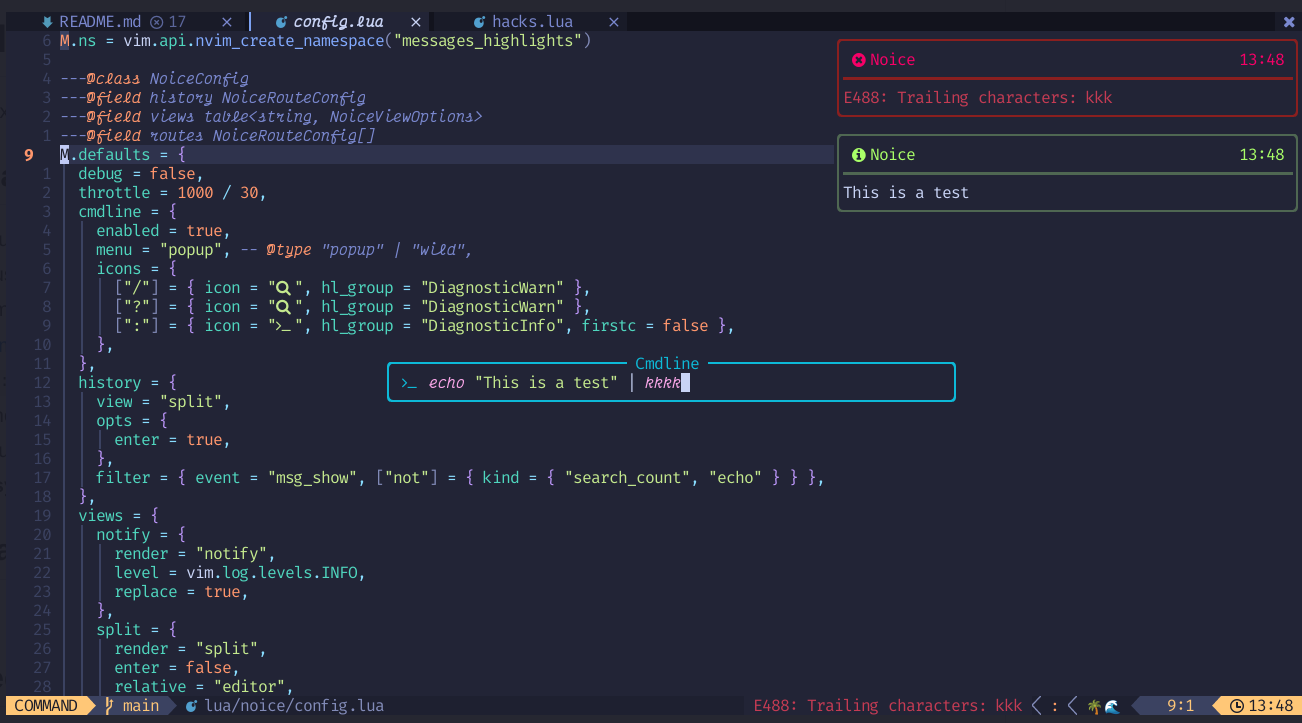
写真のように右上に爆かっこいい通知欄を追加してくれます。これもモチベーションのため必須プラグインです。
https://github.com/folke/noice.nvim

{ "folke/noice.nvim", event = "VimEnter", requires = { "MunifTanjim/nui.nvim", "rcarriga/nvim-notify", }, config = function() require("plugins.noice") end,},local noice = require("noice")
local function view(pattern, kind) kind = kind or "" return { view = "mini", filter = { event = "msg_show", kind = kind, find = pattern, }, }end
local mini_view_patterns = { { "Already at .* change" }, { "written" }, { "yanked" }, { "more lines?" }, { "fewer lines?" }, { "fewer lines?", "lua_error" }, { "change; before" }, { "change; after" }, { "line less" }, { "lines indented" }, { "No lines in buffer" }, { "search hit .*, continuing at", "wmsg" }, { "E486: Pattern not found", "emsg" },}
local routes = { { filter = { event = "notify", warning = true, find = "failed to run generator.*is not executable", }, opts = { skip = true }, },}
for _, p_config in ipairs(mini_view_patterns) do table.insert(routes, view(p_config[1], p_config[2]))end
noice.setup({ messages = { view_search = "mini", }, routes = routes,})nvim-surround
ダブルクォーテーションや括弧を自動で保管してくれるプラグインです。
https://github.com/windwp/nvim-autopairs
{ "windwp/nvim-autopairs", event = { "BufNewFile", "BufReadPre" }, config = function() require("nvim-autopairs").setup() end,}, -- double quote utilsnvim-ts-autotag
HTMLタグを閉じるの補完したり同期的にリネームするプラグインです。
https://github.com/windwp/nvim-ts-autotag
{ "windwp/nvim-ts-autotag", event = { "BufNewFile", "BufReadPre" }, config = function() require("nvim-ts-autotag").setup() end,}, -- html tag utilsgitsigns.nvim
写真のようにエディターにBlameを表示したりなどGit関連の情報を表示してくれます。
https://github.com/lewis6991/gitsigns.nvim


{ "lewis6991/gitsigns.nvim", event = { "BufReadPre" }, config = function() require("gitsigns").setup() end,}, -- show git statustoggleterm.nvim
エディター上にターミナルを召喚する魔法です。
https://github.com/akinsho/toggleterm.nvim
{ "akinsho/toggleterm.nvim", cmd = "ToggleTerm", config = function() require("plugins.toggleterm") end,},require("toggleterm").setup({ direction = "float", float_opts = { border = "rounded", width = function(term) return math.floor(vim.o.columns * 0.8) end, height = function(term) return math.floor(vim.o.lines * 0.8) end, },})nvim-colorizer.lua
カラーコードに色をつけて表示してくれます。
https://github.com/norcalli/nvim-colorizer.lua
{ "norcalli/nvim-colorizer.lua", event = { "BufNewFile", "BufReadPre", }, config = function() require("colorizer").setup() end,}, -- view colorslazygit.nvim
Neovimからlazygitを開くのに使っています。ノーマルモード時にggとタイプするとlazygitを開けます。
https://github.com/kdheepak/lazygit.nvim
{ "kdheepak/lazygit.nvim", cmd = { "LazyGit", "LazyGitConfig", "LazyGitCurrentFile", "LazyGitFilter", "LazyGitFilterCurrentFile", }, requires = { "nvim-lua/plenary.nvim", },}, -- lazygitvim.api.nvim_set_keymap("n", "gg", "<Cmd>LazyGit<CR>", opt)diagflow.nvim
LSPから出力されるdiagflowをいい感じの場所にいい感じに出力してくれます。いい感じにしてくれてありがとう。
https://github.com/dgagn/diagflow.nvim


{ "dgagn/diagflow.nvim", event = "LspAttach", config = function() require("plugins.diagflow") end,}, -- dressing diagflowrequire("diagflow").setup({ -- placement = "inline", toggle_event = { "InsertEnter", "InsertLeave" },
everity_colors = { -- The highlight groups to use for each diagnostic severity level error = "DiagnosticFloatingError", warning = "DiagnosticFloatingWarn", info = "DiagnosticFloatingInfo", hint = "DiagnosticFloatingHint", }, border_chars = { top_left = "╭", top_right = "╮", bottom_left = "╰", bottom_right = "╯", horizontal = "─", vertical = "│", }, show_borders = true, scope = "line", gap_size = 1,})lspsaga.nvim
lspsaga.nvimはdiagflow.nvimと同様LSP周りのUIをいい感じにしてくれたり、built in LSPには足りない機能を追加するプラグインです。コードアクションが使えるときに💡の絵文字を表示したり、変数などをホバーして実態を確認することなどができます。
https://github.com/nvimdev/lspsaga.nvim


| キーマップ | 説明 |
|---|---|
<C-q> | ホバードキュメントを表示 |
<C-S-q> | 定義情報を詳細に表示 |
<C-j> | 次の診断箇所にジャンプ |
gd | LSPファインダーを開く |
gp | 定義のプレビューを表示 |
gr | シンボルの名前を変更 |
ge | 現在の行の診断情報を表示 |
[e | 次の診断箇所にジャンプ |
]e | 前の診断箇所にジャンプ |
{ "nvimdev/lspsaga.nvim", event = "LspAttach", config = function() require("plugins.lspsaga") end,}, -- lspsaga ui libraryrequire("lspsaga").setup({ symbol_in_winbar = { enable = true, }, code_action_lightbulb = { enable = false, }, show_outline = { win_width = 50, auto_preview = false, }, lightbulb = { enable = true, sign = true, virtual_text = false, }, ui = { code_action = " ", border = "rounded", devicon = true, imp_sign = " ", expand = " ", },})vim.api.nvim_set_keymap("n", "<C-q>", "<Cmd>Lspsaga hover_doc<CR>", opt)vim.api.nvim_set_keymap("n", "<C-j>", "<Cmd>Lspsaga diagnostic_jump_next<CR>", opt)vim.api.nvim_set_keymap("n", "gd", "<Cmd>Lspsaga lsp_finder<CR>", opt)vim.api.nvim_set_keymap("n", "gp", "<Cmd>Lspsaga preview_definition<CR>", opt)vim.api.nvim_set_keymap("n", "gr", "<Cmd>Lspsaga rename<CR>", opt)vim.api.nvim_set_keymap("n", "ge", "<Cmd>Lspsaga show_line_diagnostics<CR>", opt)vim.api.nvim_set_keymap("n", "[e", "<Cmd>Lspsaga diagnostic_jump_next<CR>", opt)vim.api.nvim_set_keymap("n", "]e", "<Cmd>Lspsaga diagnostic_jump_prev<CR>", opt)vim-wakatime
日々のプログラミング量を表示するwakatime-apiとのインターフェイスを実装します。プラグインをインストールした後に:WakaTimeApiKeyコマンドからAPI Keyの登録ができます。
https://github.com/wakatime/vim-wakatime

 https://wakatime.com/dashboard

{ "wakatime/vim-wakatime", event = "VimEnter" }, -- wakatimedenpos.vim
denops.vimはTypeScript (Deno)で書かれたプラグインを動作させるためのレイヤーです。私も一度はdenopsでプラグインを作ってみたいですね。
https://github.com/vim-denops/denops.vim

{ "vim-denops/denops.vim", event = "VimEnter", requires = { { "vim-denops/denops-helloworld.vim", }, { "kat0h/bufpreview.vim", run = "deno task prepare", }, -- markdown viewer }, },bufpreview.vim
bufpreview.vimはリアルタイムに編集中のマークダウンをレンダリングしているdenops製のプラグインです。
バッファーのカーソル位置を参照してブラウザでレンダリングしているページをスクロールするなど、他にはない優れた機能があります。denops.vimは私ではうまく遅延読み込みができませんでしたが、実用的な機能なので妥協してます。
https://github.com/kat0h/bufpreview.vim
 https://zenn.dev/kato_k/articles/3aa7217a1636ca
さいごに
というわけで、3年間大切に育ててきた180個のプラグインが入った重厚長大なdotfilesとお別れして、かる〜いNeovimを再構築した話でした。正直、今までの三年間を崩すのが怖くて憚れていましたがやってみると清々しいものですね。起動が早くなったことによってプログラミングへのモチベーションよりフットワークの向上です。
今回紹介したプラグインは私が実際に使っているものだけを厳選しました。遅延読み込みの設定もちゃんとしてあるので、きっと軽快に動いてくれるはずです。でも何より大事なのは、私の設定をあれやこれやと提示しながら言うべきではありませんが自分の使い方に合わせてカスタマイズすることですね。
あと、プラグインの断捨離は定期的にやったほうがいいなと痛感しました。気がつくと不要なプラグインが溜まってて、それが積み重なって重くなっていくんですよね。半年に一回くらいは見直しをしようと思います。(たぶん忘れてやらないけれど・・・)
ここまで読んでくださったみなさまも快適な Neovim ライフをお過ごしください。